How to Inventory Jewelry: Numbering, Tracking & a Free Sheet
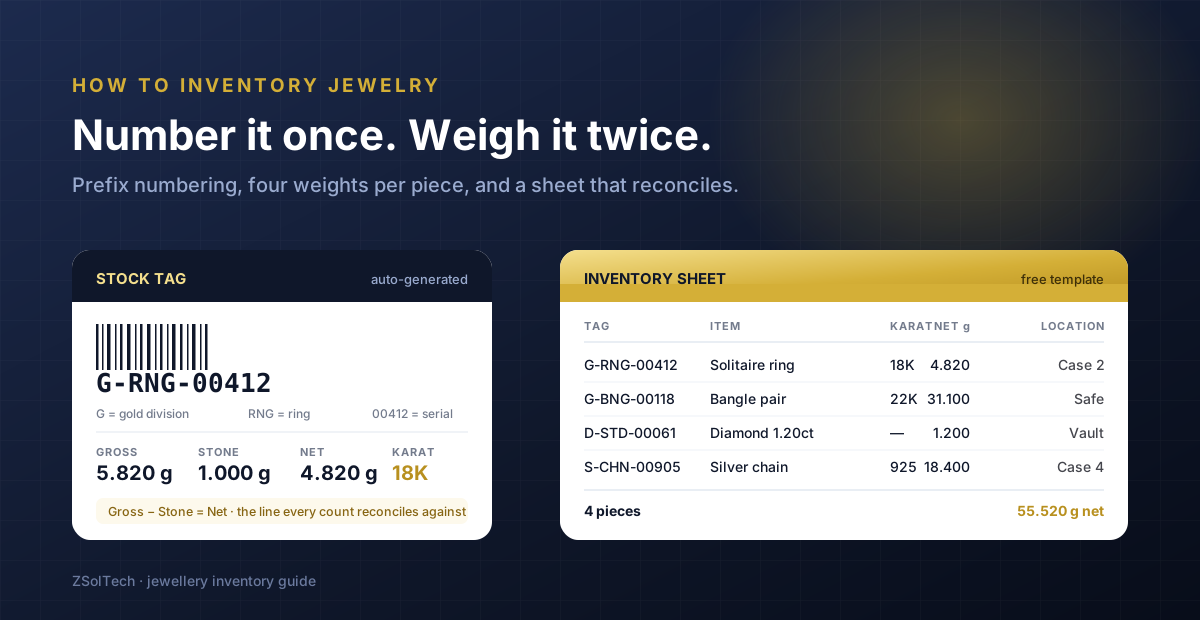
Most jewellery counts fail for the same two reasons, and neither is laziness. The first is that two people tagged stock on the same afternoon and issued the same number. The second is that somebody wrote down one weight when the piece has four. Fix those two things and a stock take stops being a dreaded weekend.
This is the practical method — how to number your jewelry inventory so numbers cannot collide, what to record on each piece, and how to keep track of jewelry inventory once it is moving. It pairs with our guide on how to organize and restock jewelry inventory, which covers storage and buying rhythm rather than identification.
Start here: a piece is two things at once
A ring is one item. It is also 4.82 grams of 18K gold plus a stone. Any jewelry inventory control system has to hold both, because they answer different questions. The piece count answers *is the solitaire still in the window?* The weight answers *what is my stock worth now that gold has moved?*
Track only pieces and your valuation is wrong every morning. Track only grams and you cannot answer a customer. This is the single thing that makes jewellery inventory different from every other kind of retail stock, and it is why generic tools feel almost right and never quite work.
How to number your jewelry inventory
Never number by hand, and never number sequentially across the whole shop. Use a prefix scheme and let the system issue the serial.
- Division prefix — G for gold, S for silver, D for diamond, W for watches. One letter, fixed forever.
- Category code — RNG, BNG, CHN, ERR. Three letters, from a closed list, so nobody invents *RING* on a Tuesday and *RG* on a Thursday.
- Serial — five digits, issued by the system, never typed. This is the part that prevents collisions when two people tag at once.
So a ring becomes G-RNG-00412. You can read the division and the category off the tag without a scanner, and the serial is guaranteed unique. Keep the scheme short — a tag that wraps onto two lines gets misread.
“The test of a numbering scheme is whether two staff tagging different trays at the same time can possibly produce the same number. If they can, it is not a scheme — it is a convention, and conventions drift.
The four weights every piece needs
This is where most jewelry inventory sheets fall short. One weight column is not enough.
| Weight | What it is | Why it matters |
|---|---|---|
| Gross | The whole piece on the scale | What the customer sees, and what a stock take physically measures |
| Stone | Total weight of stones set into it | Deducted to find the metal you actually own |
| Net | Gross minus stone | The number your gold valuation runs on |
| Pure | Net × purity (18K = 0.750) | The metal position — what you owe or hold in fine gold |
Record gross and stone, and let net and pure calculate. If a person is subtracting on a calculator, the sheet will disagree with itself by the second month.
What else belongs on the record
- Karat or purity — 22K, 18K, 925. Never leave it blank; an unmarked piece is an unvaluable piece.
- Location — case, tray, safe, vault, or out on approval. A count is much faster when the sheet tells you where to look.
- Cost — what the piece actually cost you, landed. Not the tag price.
- Supplier and date in — so you can age it later and see whose goods actually sell.
- Design or model code — the link between a physical piece and its photograph.
- Certificate number — for graded stones, held against the piece rather than in a folder.
Two fields people skip and regret: date in, because without it you cannot run an age analysis and dead stock stays invisible; and cost, because a margin report built on tag price is fiction.
A jewelry inventory sheet that reconciles
If you are starting on a spreadsheet — and plenty of good shops do — build it in this column order, because it matches the order you handle the piece: Tag · Item · Karat · Gross · Stone · Net · Cost · Location · Date in · Supplier.
Three rules make an excel jewelry inventory template survive contact with a real shop. Lock the Net column as a formula so nobody types over it. Use one row per physical piece, never per style — the moment you write *quantity 6* against a ring you have lost the ability to say which one sold. And put the tag number in the first column so a scanner can find a row instantly.
We publish a ready-made one. The free jewelry inventory software page has a downloadable CSV template with these columns already set up, and it imports directly into ZSolTech later, so nothing you build in it is wasted.
How to keep track of jewelry inventory once it moves
Recording stock is the easy half. Stock that moves is where a spreadsheet for a jewelry business starts to hurt, because a piece can be in six states and only one of them is *in the case*.
- Sold — straightforward, as long as the sale removes the exact tag rather than a style.
- Out on approval or memo — still yours, still your valuation, but not on the premises. It needs an ageing clock.
- In for repair — the customer's piece, on your premises. It must never enter your stock valuation.
- Issued to a karigar — your metal, on someone's bench. Invisible unless you track it in grams.
- In transit between branches — belongs to neither branch until received.
- Melted or broken down — left as a piece, re-entered as scrap at purity.
A spreadsheet can just about hold the first two. It cannot hold the rest without a second spreadsheet, and the second spreadsheet is where the reconciliation dies.
Counting: cycle counts beat the annual marathon
Counting everything once a year finds discrepancies eleven months after they happened, when nobody remembers the transaction. Count a section a week instead — one case, one tray type, one karat band — and a discrepancy surfaces while it is still traceable.
Reconcile on both axes. Pieces counted against pieces expected, and grams counted against grams expected. A count that matches on pieces but not on grams usually means a repair or an exchange was posted as a sale, and you will only ever see that if you check both.
When a spreadsheet stops being the right tool
There is no piece count that triggers this — it is about behaviour, not size. Move when any of these becomes true:
- More than one person edits the sheet, and you have started emailing versions.
- You take old gold in exchange, which needs to credit metal and reduce an invoice in one movement.
- You hold memo or approval stock in either direction.
- You issue metal to karigars and need to know what is out on benches today.
- Your accountant has asked for closing stock valued in grams as well as money.
- You have opened a second location.
At that point the question is not really about inventory any more — it is about whether the counter, the stock and the books are the same system. That is what jewelry inventory management software does, and if you carry stones, diamond inventory software adds parcel splitting and 4C grading on top of it.
A five-minute setup you can do today
Even if you change nothing else: agree your division and category prefixes and write them on a card by the tagging bench. Add a Stone column to your sheet and make Net a formula. Add Date In. Then count one case this week rather than the whole shop next December. Those four changes cost nothing and remove most of the reasons a count fails.
Frequently asked questions
How do you inventory jewelry for the first time?
Work one case at a time rather than attempting the whole shop. For each piece, assign a tag number from a division-and-category prefix scheme with a system-issued serial, weigh it gross, record the stone weight, let net calculate, and note karat, cost, location and the date it came in. Do not batch pieces by style — one row per physical item, always. A single case done properly is worth more than the whole shop done roughly, because the rough version has to be redone.
How should I number my jewelry inventory?
Use a prefix scheme, not a running number. A division letter (G for gold, D for diamond, S for silver), a three-letter category code from a fixed list (RNG, BNG, CHN), then a system-issued serial — giving something like G-RNG-00412. The serial must be issued automatically rather than typed, because hand-numbering is what causes two staff tagging different trays to produce the same number. Keep the whole code short enough to print on one line of a jewellery tag.
Is there a free jewelry inventory template?
Yes — we publish a free CSV template on the free jewelry inventory software page, with tag, item, karat, gross, stone, net, cost, location, date in and supplier already set up, and net as a formula. It works as a printable jewelry inventory sheet or an Excel spreadsheet, and it imports into ZSolTech if you later outgrow it, so nothing you enter is wasted.
How many weights should a jewelry inventory record?
Four: gross, stone, net and pure. Gross is what the scale shows and what a physical count measures. Stone is the total weight of set stones. Net is gross minus stone, and it is what your gold valuation runs on. Pure is net multiplied by purity — 0.750 for 18K — and it is your actual metal position. Record gross and stone; calculate the other two, because manual subtraction is where sheets start disagreeing with themselves.
How often should I count jewelry stock?
Run cycle counts weekly on a rotating section rather than one annual count. A discrepancy found within a week is usually traceable to a specific transaction; the same discrepancy found eleven months later is simply a loss. Reconcile on both pieces and grams every time — a count that balances on pieces but not on grams normally means a repair or an old-gold exchange was posted as an ordinary sale.
Can I track jewelry inventory in Excel?
For a single person in a single location, yes, and plenty of good shops start there. It stops working when more than one person edits the file, when you take old gold in part-exchange, when you hold memo stock in either direction, when you issue metal to karigars, or when you open a second location. The failure is not the spreadsheet itself — it is that these situations need stock, the counter and the ledger to be one system rather than three files.

Written by AaravJewelry Software Specialist
Aarav is a jewelry software specialist at ZSolTech with a decade in jewellery-trade systems — POS, weight-based inventory, karigar job-work and gold-rate pricing. The buyer's guides and how-tos on this blog draw on implementations for retailers, wholesalers and manufacturers across the US, Gulf and South Asia.
See it on your own data
The fastest way to judge any jewelry software is a demo against your real workflows.
Book a demoKeep reading
Top Jewelry POS Systems: How to Build a Shortlist
We are a vendor, so we will not rank ourselves first. Here is the method buyers use to shortlist a jewelry POS system — and the four tests that separate them.
Read ComparisonJewelCloud vs Jewelry ERP: Which Do You Need?
JewelCloud puts vendor catalogs on your website; a jewelry ERP runs the counter, vault and books behind it. How to tell which one you are missing.
Read